Contract approval workflow rules that stop discount creep
October 12, 2026
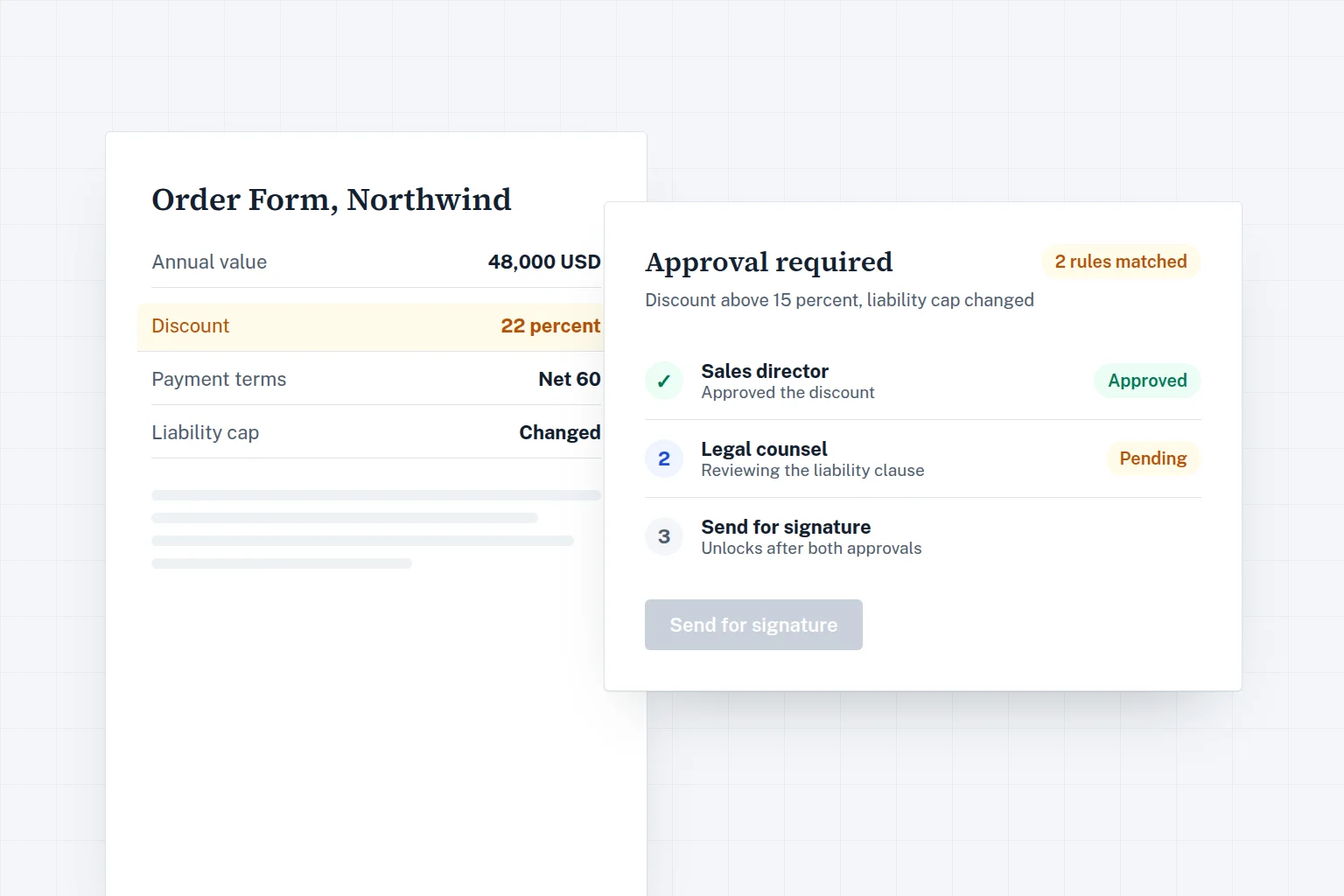
A contract approval workflow that stops discount creep routes a deal to an approver only when it crosses a defined line, such as a discount above your limit, a deal value above a threshold, or a change to a protected clause, and it does this before the agreement goes out for signature. Everything inside the lines goes straight to the customer. Everything outside them gets a named decision, recorded in the audit trail.
Discount creep rarely happens in one big decision. It happens one deal at a time: a rep offers an extra 5 percent to close before quarter end, the next rep hears about it and asks for the same, and a year later the list price is a number nobody pays. Liability caps, payment terms and governing law drift in the same way. A clear set of approval rules is the simplest way to keep those exceptions visible and deliberate.
What an approval rule actually is
An approval rule has three parts. A trigger, which is the condition that makes a deal non standard. An approver, which is the person or role who decides. And an action, which is what happens while the decision is pending, usually that the agreement cannot be sent for signature yet.
The trigger should be something the system can check from the agreement itself, not a judgment call that a rep makes about whether to ask. If approval depends on someone remembering to request it, the rule only works for people who already follow it.
The triggers that matter most
Deal value thresholds
Large deals carry more revenue and more risk, so it is reasonable for a manager or a finance lead to see them before they are signed. Set the threshold based on your own deal sizes. A useful starting point is a level that catches your larger deals without catching every routine renewal.
Discount above a limit
This is the rule that directly stops discount creep. Give reps a range they can offer on their own, for example up to 10 percent off list. Anything above that goes to the sales manager, and a higher band goes to the head of sales or finance. The point is not to forbid discounts. It is to make sure that a large discount is a decision someone owns.
Changed clauses
Some clauses protect the company more than the price does. Common ones to protect are:
- Limitation of liability. Any increase in the cap, or a carve out that removes the cap for certain claims.
- Payment terms. Longer payment windows than your standard, or payment in arrears instead of in advance.
- Indemnities. New or broader indemnity obligations.
- Termination. Termination for convenience granted to the customer, or shorter notice periods.
- Auto renewal. Removing automatic renewal or adding a price freeze on renewal.
A clause change rule fires when the text of a protected clause differs from the approved template, whoever made the edit.
Non standard governing law
If your templates are written for one jurisdiction and a customer asks for another, the whole agreement may read differently. This is a good trigger for legal review, even on small deals.
Sequential and parallel approvers
When a deal trips more than one rule, you need to decide whether approvers act one after another or at the same time.
| Approach | How it works | Use it when |
|---|---|---|
| Sequential | Approver two only sees the deal after approver one says yes. | A later approver depends on an earlier decision, for example finance should only review a discount the sales manager already accepts. |
| Parallel | All approvers receive the request at once and the deal proceeds when all have approved. | The reviews are independent, for example legal checks the liability clause while finance checks the payment terms. |
Parallel approval is faster, so use it by default for independent checks. Use sequential approval only where the order really matters. Long chains of sequential approvers are a common reason deals stall at the end of a quarter.
Keep approvals before signature
Approval should happen before the customer receives the agreement, not after. If a rep sends the contract and asks for approval later, the customer has already seen the terms, and rejecting them becomes a renegotiation instead of an internal decision. The cleanest setup blocks sending until every required approval is in place. In Signee, an agreement that trips a rule cannot be sent for signature until the approvers have signed off, and the reasons for the approval are shown on the request so the approver does not need to dig through the document.
Record who approved what
An approval is only useful later if you can prove it happened. Each approval should record who approved, when, which rule triggered it and which version of the agreement they saw. If the agreement changes after approval, for example the customer asks for a further discount, the approval should be reset so the new terms get a fresh decision. This record also sits alongside the signature audit trail, so a finance or audit review can follow the whole path from draft to signed agreement.
Why reply all email approvals fail
Many teams start with approvals by email: the rep writes "OK to give 20 percent?" and a manager replies "fine". It feels quick, and it has real problems.
- The approval is not linked to the agreement, so nobody can tell which version was approved.
- It depends on the rep remembering to ask, so the rule is only as strong as the least careful person on the team.
- Threads get forwarded, edited and lost, and the record disappears when someone leaves the company.
- There is no way to stop the agreement being sent before the reply arrives.
- Reporting is impossible. You cannot see how many deals asked for exceptions or who approved them.
A starting rule set for a 20 to 150 person B2B company
The right rules depend on your deal sizes and risk appetite, so treat the following as a template to adjust, not a standard.
- Discount up to your rep limit. No approval.
- Discount above the rep limit. Sales manager approval.
- Discount above a second, higher limit. Sales manager, then head of sales or finance, sequential.
- Deal value above your large deal threshold. Head of sales or finance approval, in parallel with any other approvals.
- Any change to limitation of liability or indemnity. Legal approval.
- Payment terms longer than standard. Finance approval.
- Governing law other than your template. Legal approval.
- Removal of auto renewal. Sales manager approval.
Start with these, run them for a quarter, then look at which rules fire often. A rule that fires on most deals is either set too low or tells you your standard terms no longer match what you sell.
Mistakes to avoid
- Too many rules on day one. If every deal needs approval, approvers stop reading and click yes. Start small.
- Approving people instead of roles. Route to roles like "sales manager" or "finance" so the rules keep working when someone is on holiday or leaves.
- No backup approver. Every role should have a delegate, or a deal waits for one person's inbox.
- Approvals that survive edits. If the terms change after approval, the approval should reset.
- Rules nobody reviews. Revisit thresholds when prices, deal sizes or templates change.
- Skipping the templates. Clause change rules only work when the standard clauses come from approved templates in the first place.
Common questions
Do approval rules slow down sales
Well designed rules speed up most deals, because standard agreements no longer wait for an informal check. Only the exceptions stop for a decision.
Which plan includes approval rules in Signee
Approval rules are part of the Business plan (149 USD a month, or 74 USD a month billed yearly, for up to 10 users) and the Company plan, which adds roles and SSO. Details are on the pricing page.
Can approvals use data from our CRM
Yes. On Business and Company, deal values and discounts can come from CRM data merged into the agreement, so the rule checks the numbers the customer will actually see.
Putting it together
The workflow is simple to describe: draft from an approved template, let rules decide whether anyone needs to look, collect approvals before sending, then send for signature with a full record. Signee's agreement workflow covers each step, from the AI contract generator that drafts from one sentence to electronic signature with signing order and reminders. Generated agreements are templates, not legal advice, so have your lawyer approve the base templates and fallback positions your rules rely on.